
RadioGroup
import { RadioGroup } from "std-widgets.slint";export component Example inherits Window { width: 200px; height: 150px; RadioGroup { title: "Target Platform"; RadioButton { text: "Desktop"; } RadioButton { text: "Mobile"; } RadioButton { text: "Embedded"; } }}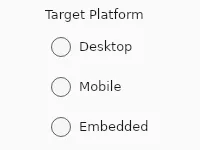
A group of radio buttons where the user picks exactly one option.
RadioGroup only accepts RadioButton children, either listed statically
or produced by a single for loop.
if inside a RadioGroup is not supported, and a for must be the only
child of the group.
Properties
Section titled “Properties”current-value
Section titled “current-value” string (in-out) default: ""
The text of the currently selected RadioButton.
enabled
Section titled “enabled” bool default: true
When false, the group and its buttons don’t react to input.
has-focus
Section titled “has-focus” bool (out)
true while any radio button in the group has keyboard focus.
string default: ""
An optional label rendered above the group. When empty, no title is shown.
orientation
Section titled “orientation” enum Orientation default: vertical
Use Orientation.vertical (default) to stack options, or Orientation.horizontal for a single row.
Orientation
Represents the orientation of an element or widget such as the Slider.
horizontal: Element is oriented horizontally.vertical: Element is oriented vertically.
Callbacks
Section titled “Callbacks”selected(string)
Section titled “selected(string)”Invoked when the user selects a different option. The argument is the text of the newly selected entry.
RadioGroup { RadioButton { text: "Desktop"; } RadioButton { text: "Mobile"; } selected(value) => { debug("Selected: ", value); }}RadioButton
Section titled “RadioButton”RadioButton is a pseudo-element that only appears inside RadioGroup.
Properties
Section titled “Properties” string default: ""
Label shown next to the radio indicator.
bool default: true
When false, the user can’t select this button.
The button stays visible.
bool (in-out) default: false
true when this is the currently selected button.
By default checked tracks the group’s selection: when a button is clicked
it becomes true, and the previously-checked button’s checked becomes
false.
Setting checked = true from outside selects this button on the next
event loop iteration; the previously-checked button goes unchecked.
Setting checked = false on the currently-selected button is reverted —
the group always has at most one selection.
Programmatic selection on a disabled button is refused.
Use a two-way binding (checked <=> model.field) to keep the
button in sync with an external property, including with a for
over a model:
RadioGroup { for m in [{ name: "Mobile", checked: false }, { name: "Desktop", checked: true }]: RadioButton { text: m.name; checked <=> m.checked; }}A one-way binding (checked: cond) works for the initial state and
stays reactive until another button in the group is selected — at
that point the group writes checked = false and the binding to
cond is severed. Prefer <=> for cases where cond keeps changing.
Callbacks
Section titled “Callbacks”toggled()
Section titled “toggled()”Invoked when this button’s checked state changes — both when it becomes the selection and when another button takes it over.
RadioGroup { RadioButton { text: "Mobile"; toggled => { debug("Mobile is now", self.checked ? "selected" : "unselected"); } }}Dynamic Buttons
Section titled “Dynamic Buttons”Drive the buttons from a model with for.
The for must be the only child of the group — mixing it with static
RadioButton siblings isn’t supported.
RadioGroup { for option in ["Desktop", "Mobile", "Embedded"]: RadioButton { text: option; }}© 2026 SixtyFPS GmbH